
Product · Discover CCMS
Structured content,
written where your team already works.
A component content platform built around the repository — not the editor. Author in DITA, Markdown, or HTML, using Oxygen, Fonto, Simply XML, the browser, or your IDE. One source. Every channel.
DITA 1.3 · Markdown · HTML · SOC 2 Type II · 24×7 critical-care support
What we built
Repository first.
Editor? Your call.
A real repository
Typed components, taxonomy, branching, audit. The system of record — not a file pile.
Your team's editors
Oxygen, Fonto, Simply XML, browser, or IDE + Git. Five surfaces, one source.
DITA + Markdown + HTML
Mix freely. Cross-format conrefs. Engineering and writing converge.
01 · The repository
The repository is the product.
Most CCMSs are an editor with a database bolted on. DCX is the other way around. The repository is typed, versioned, and governed — and the editor is whatever your team already uses to reach into it.
That single decision is what makes reuse, branching, audit, and migration actually work — instead of just appearing in the feature matrix.
Component repository
Every topic, image, snippet, and map is a versioned component. Not a file. Not a wiki page. A typed object you can govern.
Branching & merging
Major releases get their own branch. Minor fixes merge back. The repo enforces structure — your writers don't have to.
Audit & access
RBAC down to the project, branch, and component. SAML, OIDC, SCIM. Every change attributed and exportable.
Taxonomy you own
Product, audience, version, locale — typed metadata, not folder names. Filters, conditions, and publishing all key off it.
02 · Authoring surfaces
You can pry Oxygen out of their cold dead hands.
Good. Don't make them switch.
Every team we've ever rolled out to has a different favorite editor. We stopped fighting it. Five surfaces, one repository — your people keep what works, the source of truth stays single.
Oxygen XML
NativePro writers
Web and Desktop. Full DITA fidelity, schema validation, structured editing. The XML editor of choice.
Discover CX editor
Built-inBuilt for your team
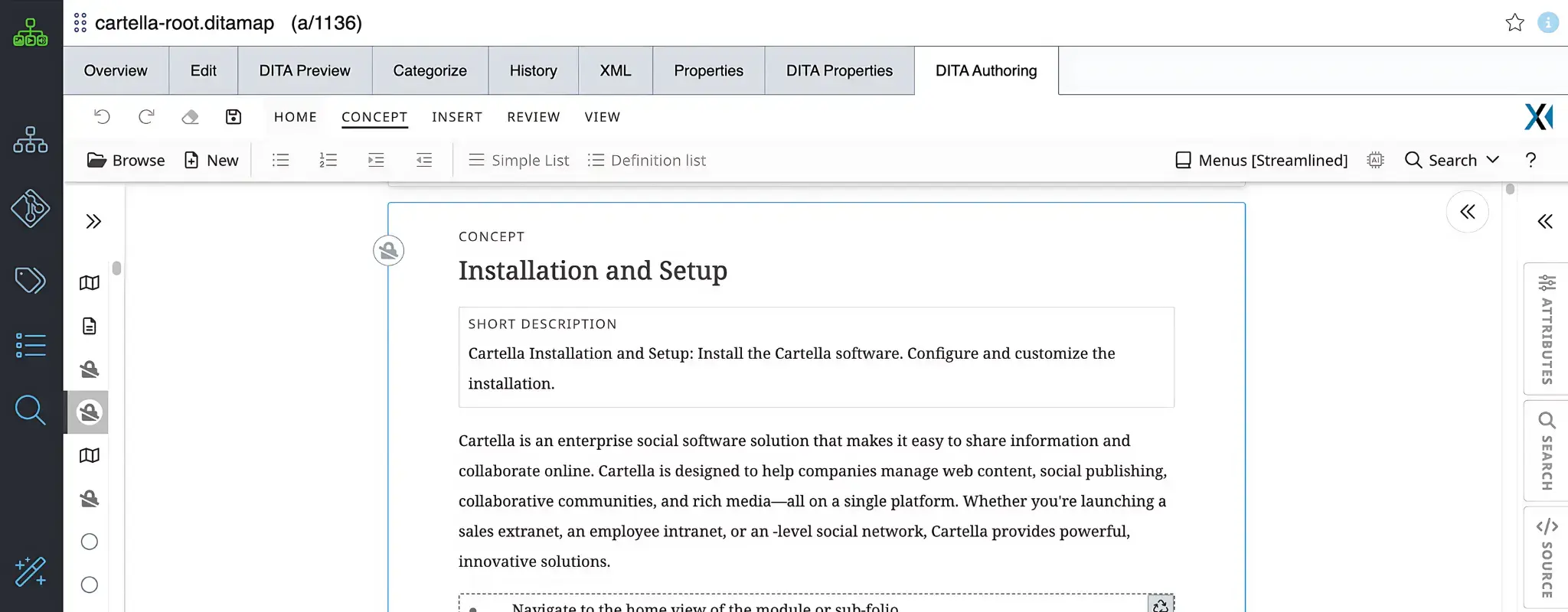
Our browser-based authoring client. Built on Fonto, extended with AI assist, native comments and revisions, Oxygen round-trip, and usage analytics. No install, no IT ticket — see the deep dive below.
Simply XML
NativeSMEs in Word
Your SMEs already use Microsoft Word. Simply XML lets them draft structured topics there without retraining.
Fonto
NativeExternal Fonto licenses
If your team already runs standalone Fonto, we integrate natively. Most teams use the built-in Discover CX editor instead — same engine, more capability.
IDE + Git
For engineersDoc-as-code teams
VS Code, IntelliJ, Cursor — anything that speaks Git. Lint and preview locally. Push a PR. We open a review task.
About Git
Git is an authoring surface, not the whole product. If your engineering team works in their IDE, we expose every project as a Git remote so they can clone, branch, lint, and push PRs — and the CCMS reviews their changes like any other contribution. If your writers don't live in Git, they never touch it.
02a · The Discover CX editor
Authoring,
without the angle brackets.
Our built-in browser editor — engineered on top of Fonto, the industry-leading XML editor — and extended with everything an enterprise team actually needs: AI assistance, native review, Oxygen round-trip, and usage analytics. No install, no plugin tax, no "light edits only" asterisk.
Writers get a WYSIWYG surface that respects DITA structure. SMEs get a clean text-first experience that hides the schema. Both are working in the same repository, on the same topics, at the same time.
03 · Content types
DITA when you need structure.
Markdown when you need speed.
Both are first-class. DITA brings the validation, reuse, and governance enterprise content demands. Markdown is lighter and faster — ideal for engineering docs, release notes, READMEs, and in-product help. Same repository. Same publishing pipeline.
DITA
Native, end-to-end. DITA 1.3, DITA-OT 4.x. Concept, task, reference, glossary, and your specializations. Conrefs, keyrefs, conditional processing — all of it.
Markdown
Lighter and faster than DITA — perfect for engineering docs, READMEs, release notes, and in-product help. Same repository, same publishing pipeline.
HTML
For legacy imports, marketing-adjacent content, and bespoke knowledge articles. Schema-validated, not free-text.
Mixed in one repo
Cross-format conrefs. A DITA topic can reuse a Markdown snippet. Engineering and writing converge instead of forking.
04 · Operations
Reuse, review, translate, ship.
The boring stuff that actually decides whether your CCMS earns its keep. We didn't skip it.
Reuse & single-sourcing
Conrefs, keyrefs, conditional processing, profiling, branching. Write once, ship to every channel and product line.
Workflow & review
Custom states, multi-step approvals, scheduled publishing. Inline review and SME sign-off built in.
Translation
Locale fan-out from a single source. XLIFF 2.1 round-trip with Smartling, Lilt, XTM. Translation memory native.
AI co-authoring
Generate first-draft topics, summarize for short-form, validate structure. SME-safe, version-controlled. Optional, not enforced.
Multi-format publishing
DITA-OT pipeline outputs HTML5, PDF, Markdown, EPUB — and feeds the Delivery API simultaneously. No nightly rebuild.
Migration
Inbound from MadCap, Paligo, Heretto, IXIASOFT, Confluence. A migration engineer owns it end-to-end. No fidelity loss.
Authoring
Discover CCMS
Component
Repository
Versioned · Typed · Governed
Delivery
05 · Publishing
One source. Every surface.
The DITA-OT pipeline outputs HTML5, PDF, Markdown, EPUB — and at the same time, the Delivery API serves clean, typed JSON to portals, in-product help, partner sites, and AI assistants.
No nightly rebuild. No “published” versus “staged” drift. A topic ships in seconds, everywhere.
06 · Migration
You don't leave your content behind.
A migration engineer owns it end-to-end. Projects, conrefs, conditional tags, taxonomy, workflow rules — converted with no fidelity loss. Included with Business and Enterprise.
Typical migrations run 4–12 weeks. Most teams ship a parallel pilot in three.
FAQ
Discover CCMS — what buyers ask
Is Discover CCMS DITA-only?+
No. DITA, Markdown, and HTML are all first-class authoring formats — in the same repository, with cross-format conrefs. Heretto and IXIASOFT are DITA-only. DCX lets engineering write in Markdown while documentation writes in DITA, with both flowing through the same publishing pipeline.
Can we keep our existing editor?+
Yes. Oxygen (Web + Desktop), Fonto, and Ingeniux Simply XML for Microsoft Word are natively integrated. Doc-as-code teams use any IDE that speaks Git. The repository is the system of record — the editor is whatever your team already knows.
How does the Git option work?+
Each project is exposed as a Git remote. Authors clone, branch, edit locally, lint and preview, then push a PR. The CCMS UI and the Git surface read from the same repository — there's no two-way sync, no drift, no merge surprises. Git is one authoring surface, not the whole product.
How does this compare to Paligo?+
Paligo is a strong cloud-only structured editor. DCX gives you the same structured authoring plus a true component repository, mixed format support (not DITA-only), and an integrated Delivery API and customer portal. Paligo's strength is the editor; DCX's strength is what sits behind it.
How does this compare to Heretto?+
Heretto is a strong cloud DITA-only CCMS with the Deploy portal as a separate add-on. DCX handles DITA + Markdown + HTML in one repo, ships with a real Git surface as an optional authoring path, and the Discover portal is included in the platform — not a separate license.
Can we migrate from MadCap Flare, Paligo, Heretto, or IXIASOFT?+
Yes. Migration is included with Business and Enterprise engagements. A dedicated migration engineer handles conversion of projects, conditional tags, conrefs, taxonomy, and workflow rules with no fidelity loss. Typical migrations run 4–12 weeks depending on volume and complexity.
Bring your content. Watch it click.
A 30-day proof of concept on your real DITA, Markdown, or legacy CCMS export — with your editors, your workflow, and a migration engineer on the call.